电脑Clash Verge客户端使用方法(进阶客户端)
2026/8/10
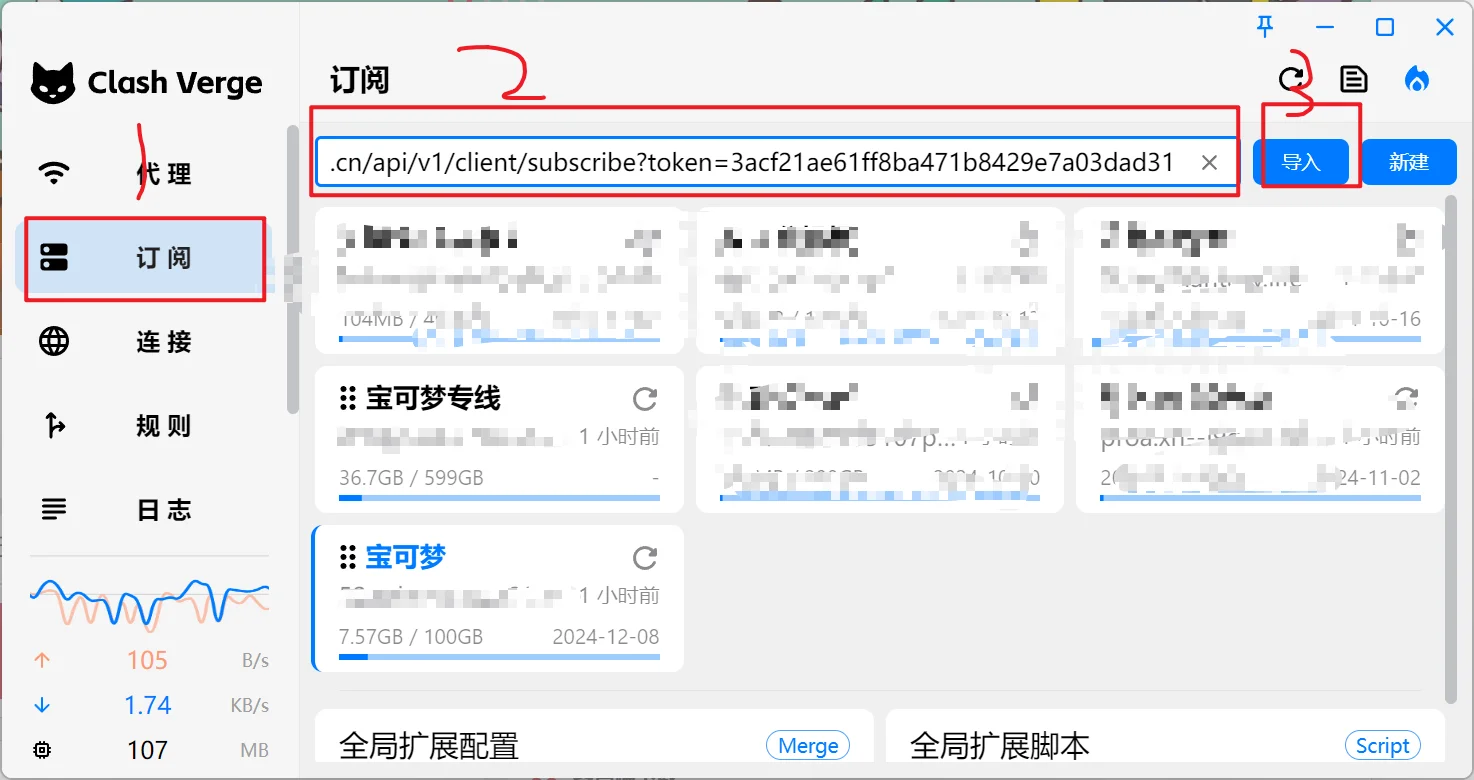
{"type":"doc","content":[{"type":"paragraph","content":[{"type":"text","marks":[{"type":"bold"}],"text":"为了方便大家使用飞机✈️和使用翻墙网络资源,"},{"type":"hardBreak","marks":[{"type":"bold"}]},{"type":"text","marks":[{"type":"bold"}],"text":"平台整理了一些常用工具。"},{"type":"hardBreak","marks":[{"type":"bold"}]},{"type":"hardBreak","marks":[{"type":"bold"}]},{"type":"text","marks":[{"type":"bold"}],"text":"推荐服务:"},{"type":"hardBreak","marks":[{"type":"bold"}]},{"type":"text","marks":[{"type":"bold"}],"text":"网络加速工具"},{"type":"hardBreak","marks":[{"type":"bold"}]},{"type":"hardBreak","marks":[{"type":"bold"}]},{"type":"text","marks":[{"type":"bold"}],"text":"新人注册邀请码:"},{"type":"hardBreak","marks":[{"type":"bold"}]},{"type":"text","marks":[{"type":"bold"}],"text":"8dlSvSKx"},{"type":"hardBreak","marks":[{"type":"bold"}]},{"type":"hardBreak","marks":[{"type":"bold"}]},{"type":"text","marks":[{"type":"bold"}],"text":"点击注册:"},{"type":"hardBreak","marks":[{"type":"bold"}]},{"type":"text","marks":[{"type":"link","attrs":{"href":"https://love2.p6m6.com/#/register?code=8dlSvSKx","target":"_blank","rel":"noopener noreferrer nofollow","class":null,"title":null}},{"type":"bold"}],"text":"https://love2.p6m6.com/#/register?code=8dlSvSK"}]},{"type":"paragraph"},{"type":"paragraph","content":[{"type":"text","marks":[{"type":"bold"}],"text":"一. 下载并安装最新"}]},{"type":"paragraph"},{"type":"paragraph","content":[{"type":"text","marks":[{"type":"link","attrs":{"href":"https://share.feijipan.com/s/dd0gSwcf","target":"_blank","rel":"noopener noreferrer nofollow","class":null,"title":null}},{"type":"bold"}],"text":"👉 小飞机网盘"},{"type":"text","marks":[{"type":"bold"}],"text":" (此网盘无需挂代理,大陆网络可以直接打开,建议使用edge浏览器下载"}]},{"type":"paragraph"},{"type":"paragraph","content":[{"type":"text","marks":[{"type":"link","attrs":{"href":"http://wwatd.zizi2.com/sZtfgA7K8p43","target":"_blank","rel":"noopener noreferrer nofollow","class":null,"title":null}},{"type":"bold"}],"text":"👉 蓝奏云网盘"},{"type":"text","marks":[{"type":"bold"}],"text":" (此网盘无需挂代理,大陆网络可以直接打开,建议使用edge浏览器下载"}]},{"type":"paragraph"},{"type":"paragraph","content":[{"type":"text","marks":[{"type":"link","attrs":{"href":"http://8.211.155.123:5212/s/QMTN?path=%2F","target":"_blank","rel":"noopener noreferrer nofollow","class":null,"title":null}}],"text":"Windows 64位版下载(云盘下载)"}]},{"type":"paragraph"},{"type":"paragraph","content":[{"type":"text","marks":[{"type":"link","attrs":{"href":"https://github.com/clash-verge-rev/clash-verge-rev/releases/download/v2.4.7/Clash.Verge_2.4.7_x64-setup.exe","target":"_blank","rel":"noopener noreferrer nofollow","class":null,"title":null}}],"text":"Windows 64备用下载1"}]},{"type":"paragraph"},{"type":"paragraph","content":[{"type":"text","marks":[{"type":"link","attrs":{"href":"https://github.com/clash-verge-rev/clash-verge-rev/releases/download/v2.4.7/Clash.Verge_2.4.7_x64.dmg","target":"_blank","rel":"noopener noreferrer nofollow","class":null,"title":null}}],"text":"Mac intel版下载"}]},{"type":"paragraph"},{"type":"paragraph","content":[{"type":"text","marks":[{"type":"link","attrs":{"href":"https://github.com/clash-verge-rev/clash-verge-rev/releases/download/v2.4.7/Clash.Verge_2.4.7_aarch64.dmg","target":"_blank","rel":"noopener noreferrer nofollow","class":null,"title":null}}],"text":"Mac M芯片版下载"}]},{"type":"paragraph"},{"type":"paragraph","content":[{"type":"text","marks":[{"type":"link","attrs":{"href":"https://github.com/clash-verge-rev/clash-verge-rev/releases","target":"_blank","rel":"noopener noreferrer nofollow","class":null,"title":null}}],"text":"Github 版本库"}]},{"type":"paragraph"},{"type":"paragraph"},{"type":"paragraph","content":[{"type":"text","marks":[{"type":"bold"}],"text":"二. 购买套餐后导入订阅"}]},{"type":"paragraph","content":[{"type":"text","marks":[{"type":"bold"}],"text":"1. 安装完成后,从“桌面”或“开始菜单”找到 Clash Verge 并运行。2. 从网站“仪表盘”中点,复制订阅地址。打开 Clash Verge,点击“配置”,将订阅地址粘贴到文本框中,然后点击“导入”,即可看到套餐:或者点击这里点击复制订阅地址"}]},{"type":"image","attrs":{"src":"https://s2.loli.net/2024/12/25/bSd1FloxW92DNiR.png","alt":"复制订阅","title":null,"width":null,"height":null}},{"type":"paragraph"},{"type":"paragraph"},{"type":"paragraph","content":[{"type":"text","marks":[{"type":"bold"}],"text":"3. 点击“订阅”,将订阅链接粘贴其中并导入:"}]},{"type":"paragraph"},{"type":"paragraph"},{"type":"image","attrs":{"src":"https://s2.loli.net/2024/10/11/W6Ky4j8CVzBeTpX.png","alt":"","title":null,"width":null,"height":null}},{"type":"paragraph"},{"type":"paragraph"},{"type":"paragraph","content":[{"type":"text","marks":[{"type":"bold"}],"text":"4. 点击“设置”启用代理,开始使用:"}]},{"type":"paragraph"},{"type":"paragraph"},{"type":"image","attrs":{"src":"https://img.remit.ee/api/file/BQACAgUAAyEGAASHRsPbAAETaxFp5uE_J_nRBOWI1cJSrqWdGiA7igACRiMAAnKFOFdnrNAhMrwWdzsE.png","alt":"BQACAgUAAyEGAASHRsPbAAETaxFp5uE_J_nRBOWI1cJSrqWdGiA7igACRiMAAnKFOFdnrNAhMrwWdzsE.png","title":null,"width":null,"height":null}},{"type":"paragraph"},{"type":"paragraph"},{"type":"paragraph","content":[{"type":"text","marks":[{"type":"bold"}],"text":"5.返回到代理,选择合适的节点常见问题:"}]},{"type":"bulletList","content":[{"type":"listItem","content":[{"type":"paragraph","content":[{"type":"text","marks":[{"type":"bold"}],"text":"注意1: 如果 Clash Verge 运行出现错误,尝试修改测速链接为 "},{"type":"text","marks":[{"type":"link","attrs":{"href":"http://www.google-analytics.com/generate_204","target":"_blank","rel":"noopener noreferrer nofollow","class":null,"title":null}},{"type":"bold"}],"text":"http://www.google-analytics.com/generate_204"},{"type":"text","marks":[{"type":"bold"}],"text":" 或其他有效的测速链接。"}]}]},{"type":"listItem","content":[{"type":"paragraph"}]},{"type":"listItem","content":[{"type":"paragraph"},{"type":"image","attrs":{"src":"https://s2.loli.net/2024/10/11/RBzpFiNbVtO7qUL.png","alt":"","title":null,"width":null,"height":null}}]},{"type":"listItem","content":[{"type":"paragraph"}]},{"type":"listItem","content":[{"type":"paragraph"}]},{"type":"listItem","content":[{"type":"paragraph","content":[{"type":"text","marks":[{"type":"bold"}],"text":"注意1.1: 如果 Clash Verge 测速节点出现error异常,请到“控制面板/应用管理”中修复或下载安装 "},{"type":"text","marks":[{"type":"link","attrs":{"href":"https://go.microsoft.com/fwlink/p/?LinkId=2124703","target":"_blank","rel":"noopener noreferrer nofollow","class":null,"title":null}},{"type":"bold"}],"text":"Webview 2"},{"type":"text","marks":[{"type":"bold"}],"text":"。"}]}]}]},{"type":"paragraph"},{"type":"bulletList","content":[{"type":"listItem","content":[{"type":"paragraph","content":[{"type":"text","marks":[{"type":"bold"}],"text":"注意2 (MacOS): 如果 MacOS 提示文件已损坏,请在终端中执行以下命令以解除系统限制:"}]}]},{"type":"listItem","content":[{"type":"paragraph"}]},{"type":"listItem","content":[{"type":"paragraph","content":[{"type":"hardBreak","marks":[{"type":"bold"}]},{"type":"text","marks":[{"type":"bold"}],"text":"sudo xattr -r -d com.apple.quarantine /Applications/Clash\\ Verge.app"}]}]},{"type":"listItem","content":[{"type":"paragraph"}]},{"type":"listItem","content":[{"type":"paragraph"}]},{"type":"listItem","content":[{"type":"paragraph","content":[{"type":"text","marks":[{"type":"bold"}],"text":"注意3: 请定期访问教程页面检查更新,使用最新客户端以提升上网体验。"}]}]},{"type":"listItem","content":[{"type":"paragraph"}]},{"type":"listItem","content":[{"type":"paragraph"}]},{"type":"listItem","content":[{"type":"paragraph","content":[{"type":"text","marks":[{"type":"bold"}],"text":"注意4: 如果 Clash Verge 被杀毒软件误报,请允许所有相关权限,建议卸载 360 杀毒软件。"}]}]}]},{"type":"paragraph"},{"type":"paragraph","content":[{"type":"text","marks":[{"type":"bold"}],"text":"其他:"}]},{"type":"paragraph","content":[{"type":"text","marks":[{"type":"bold"}],"text":"MacOS 用户如果需要使用 tun 模式,请赋予内核权限,执行以下命令:"}]},{"type":"paragraph"},{"type":"paragraph"},{"type":"paragraph","content":[{"type":"text","marks":[{"type":"bold"}],"text":"sudo chown root:admin /Applications/Clash\\ Verge.app/Contents/MacOS/clash-meta"},{"type":"hardBreak","marks":[{"type":"bold"}]},{"type":"text","marks":[{"type":"bold"}],"text":"sudo chmod +sx /Applications/Clash\\ Verge.app/Contents/MacOS/clash-meta"}]}]}